Throwing Disks Are Live on BD ZONE 26.2
 joynalbokhsho
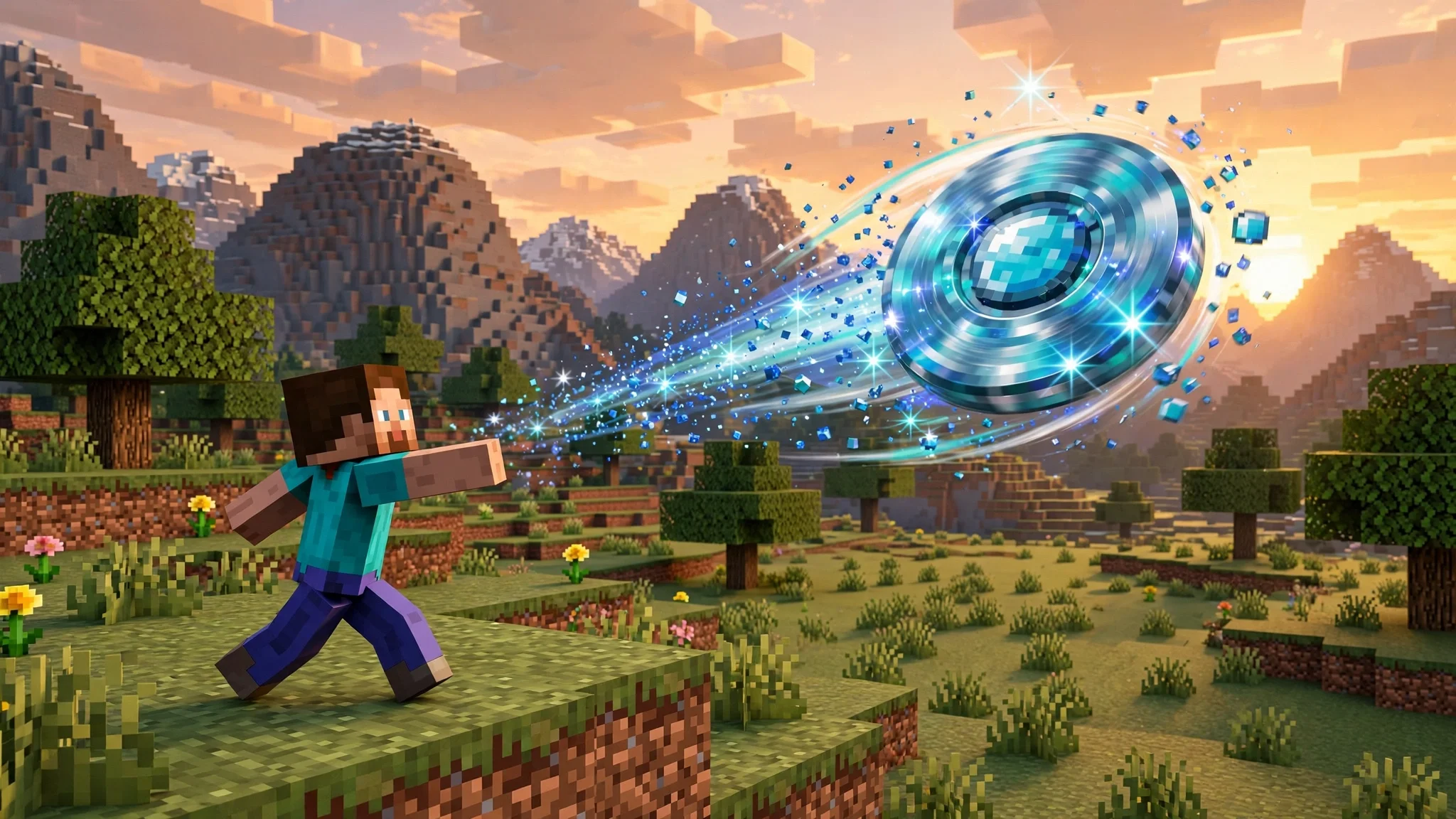
Throwing disks are now live on BD ZONE 26.2, and everyone can craft and use them right now. Mojang recently revealed the brand new Throwing Disc, and we recreated it and added it to our 26.2 server early, so you do not have to wait for the official release to try it. This is a throwable weapon that pierces through enemies, bounces off walls, and flies right back to you.
If you like fast, skill based combat, throwing disks are going to change how you fight. Here is everything you need to know: how to craft one, how to throw it, what the Diamond Disk can do, and which enchantments make it even stronger.
What Are Throwing Disks?
Throwing disks are a new throwable weapon on BD ZONE. Mojang revealed the Throwing Disc as a new item, and our 26.2 update brings a recreated version of it to the server ahead of the official release. You throw it at your enemies, it cuts through them, bounces off the walls around them, and then returns to your hand, ready to throw again.
Unlike a bow or a trident, throwing disks are built for close and mid range fights where movement matters. You can throw from your main hand or your off hand, so you can keep your sword or shield ready while the disk does its work. Throwing disks reward good aim and smart positioning: line up a group of enemies and one throw can hit them all.
How to Craft a Throwing Disk
Crafting throwing disks is simple. Place 4 Diamonds in a plus shape on a crafting table: one in the top middle, one in the middle left, one in the middle right, and one in the bottom middle. The four diamonds form a ring around the empty center slot, and the crafting table turns them into a Diamond Throwing Disk.
Other tiers can be crafted the same way, so diamonds are not your only option. Use the same plus shape with the material for the tier you want, and the recipe works the same. Every player can craft throwing disks, with no rank or special permission needed.
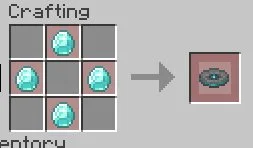

3x3 Grid (3x3 layout)
- 3x3 Grid Slot 2 (#1): Diamond
- 3x3 Grid Slot 4 (#3): Diamond
- 3x3 Grid Slot 6 (#5): Diamond
- 3x3 Grid Slot 8 (#7): Diamond
How to Throw It
Throwing a disk is as easy as a right click. Hold the disk in your main hand or your off hand and right click to throw it. The disk flies out, pierces through enemies in its path, bounces off walls, and then flies right back to you.
The bounce is what makes throwing disks special. A throw that misses its first target can still hit something after bouncing off a wall, and every bounce extends the range. In a tight space like a cave, a corridor, or a base interior, a single well aimed throw can keep bouncing and hitting while you stay safe behind cover.
Diamond Throwing Disk Stats
The Diamond Throwing Disk is the tier shown in the screenshots, and its stats are strong for a throwable weapon.
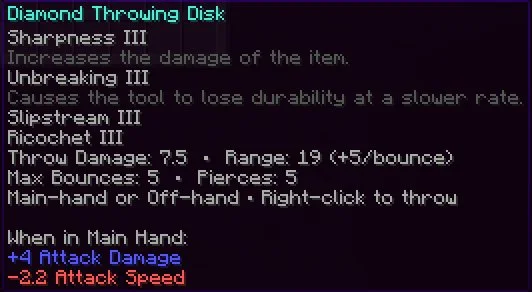
- Throw Damage: 7.5, and it scales with Sharpness
- Range: 19 blocks, plus 5 blocks per bounce
- Max Bounces: 5 (with Ricochet III)
- Pierces: 5
- Main hand: plus 4 Attack Damage, minus 3.2 Attack Speed
- Use: main hand or off hand, right click to throw
The range number is the key stat to understand. A throw starts at 19 blocks, and every bounce adds 5 more blocks of range, so a disk that bounces five times travels much further than a single straight throw. With Ricochet III, the disk reaches its full 5 bounces and 5 pierces, which is the strongest version of the weapon.
Enchantments for Throwing Disks
Throwing disks support the enchantments you would expect on a weapon, plus two custom enchantments made for them.
Sharpness increases the throw damage, so the 7.5 base damage on the Diamond Disk scales up with each level. Unbreaking slows down durability loss, which matters for a weapon you throw again and again. Mending repairs the disk with experience, keeping it in fighting shape for the long run.
Then there are the two custom enchantments. Ricochet adds more bounces and extra range, pushing the disk toward its maximum of 5 bounces and 5 pierces. Slipstream makes the disk fly faster and return to you sooner, so you can throw again without waiting around. The example disk in the screenshots carries Sharpness III, Unbreaking III, Slipstream III, and Ricochet III, which is the fully powered version.
Tips for Using Throwing Disks
- Line up your targets. The disk pierces, so a throw through a group hits more than one enemy. Wait for them to line up, then throw.
- Use the walls. A bounce adds 5 blocks of range, so in enclosed spaces your disk travels further and hits more. Aim at a wall behind your target and let the bounce do the work.
- Keep moving. Slipstream brings the disk back faster, and a moving target is harder to hit. Throw, reposition, and throw again.
- Enchant for bounces first. Ricochet is what turns a good throw into a great one, because more bounces mean more range and more hits.
- Carry a backup. Unbreaking and Mending keep one disk alive for a long time, but a spare disk in your inventory means you are never caught without one.
FAQ
Can everyone craft throwing disks?
Yes. Every player on the 26.2 server can craft and use throwing disks right now, with no rank or permission needed.
What materials do I need?
The Diamond Disk needs 4 Diamonds in a plus shape on a crafting table. Other tiers use the same shape with their own material.
What happens when the disk hits a wall?
It bounces off and keeps going. Every bounce adds 5 blocks of range, up to 5 bounces with Ricochet III.
Does the disk come back to me?
Yes. After it pierces and bounces, the disk flies right back to you. Slipstream makes the flight and the return faster.
Which enchantments work on throwing disks?
Sharpness, Unbreaking, and Mending work, plus the two custom enchantments Ricochet and Slipstream. Ricochet adds bounces and range, Slipstream adds flight and return speed.
Do throwing disks work in the off hand?
Yes. You can throw from your main hand or your off hand with a right click.
Craft Yours Now
Throwing disks are live on BD ZONE 26.2, and they are ready to craft today. Make a Diamond Throwing Disk, enchant it with Ricochet and Slipstream, and see how far a single throw can go. Good luck, and watch out for the bounce.
Play on Java at PLAY.BDZONEMC.COM and join the community on Discord at https://discord.gg/QzhjgYZNGs.